From order email to order in Fortnox.
Skip retyping order lines. Fyord reads customer orders from email, PDF, Excel and CSV and matches customers and items against your records in Fortnox. You review the draft and approve it before the order is created.
No setup fee. Guided onboarding included. No lock-in.
Less order administration, more time for customers
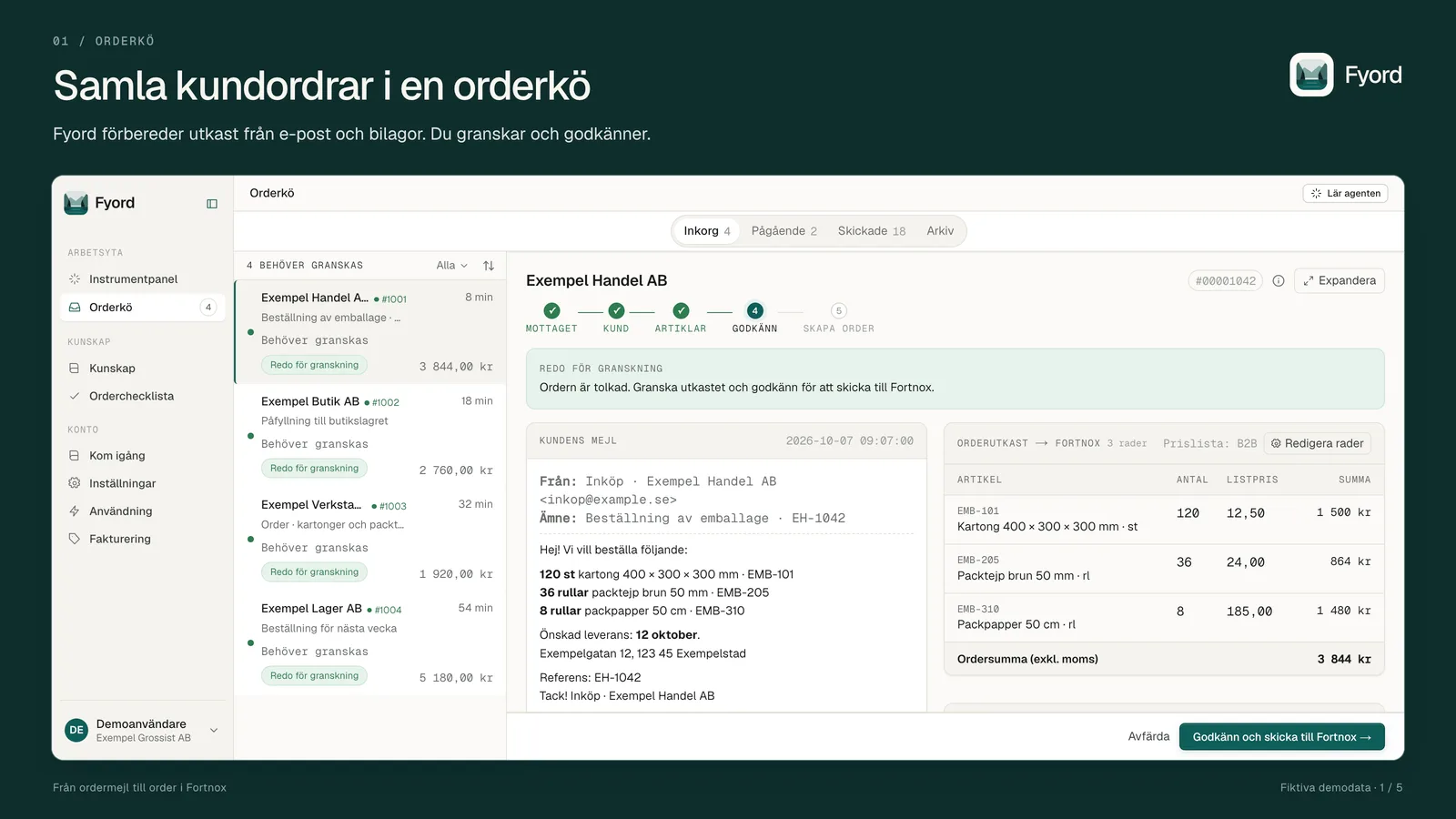
The customer's email contains the order. Fortnox holds your customers, items and price lists. Fyord brings them together in an order draft your team can review, edit and approve.
Let customers keep emailing
Collect customer orders from emails and PDF, Excel and CSV attachments in one order queue in Fyord. Customers order as usual.
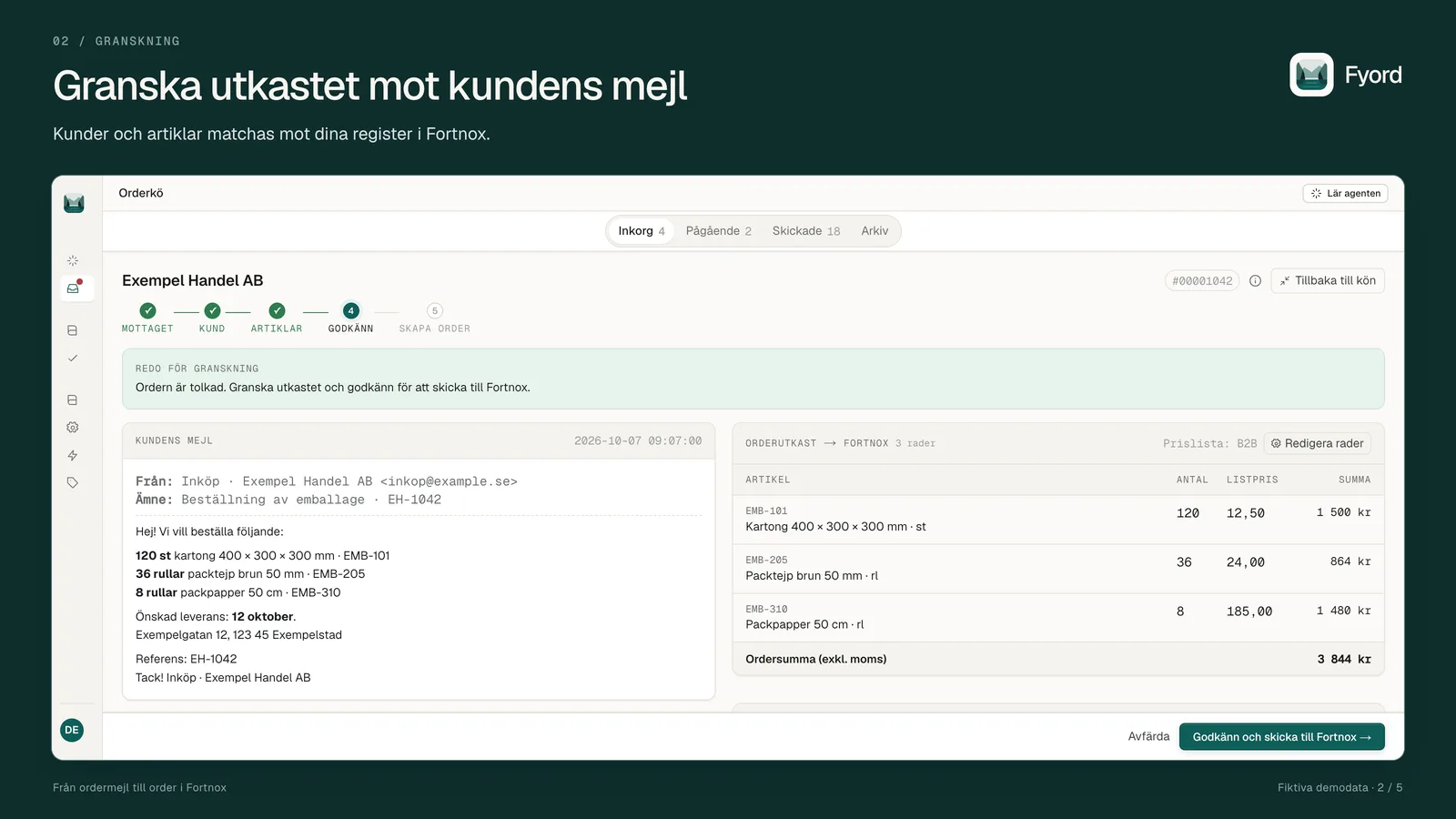
Review a prepared draft
Get customer and item suggestions from your Fortnox records. Check the order against the customer's email and make changes before approving.
Keep pricing in Fortnox
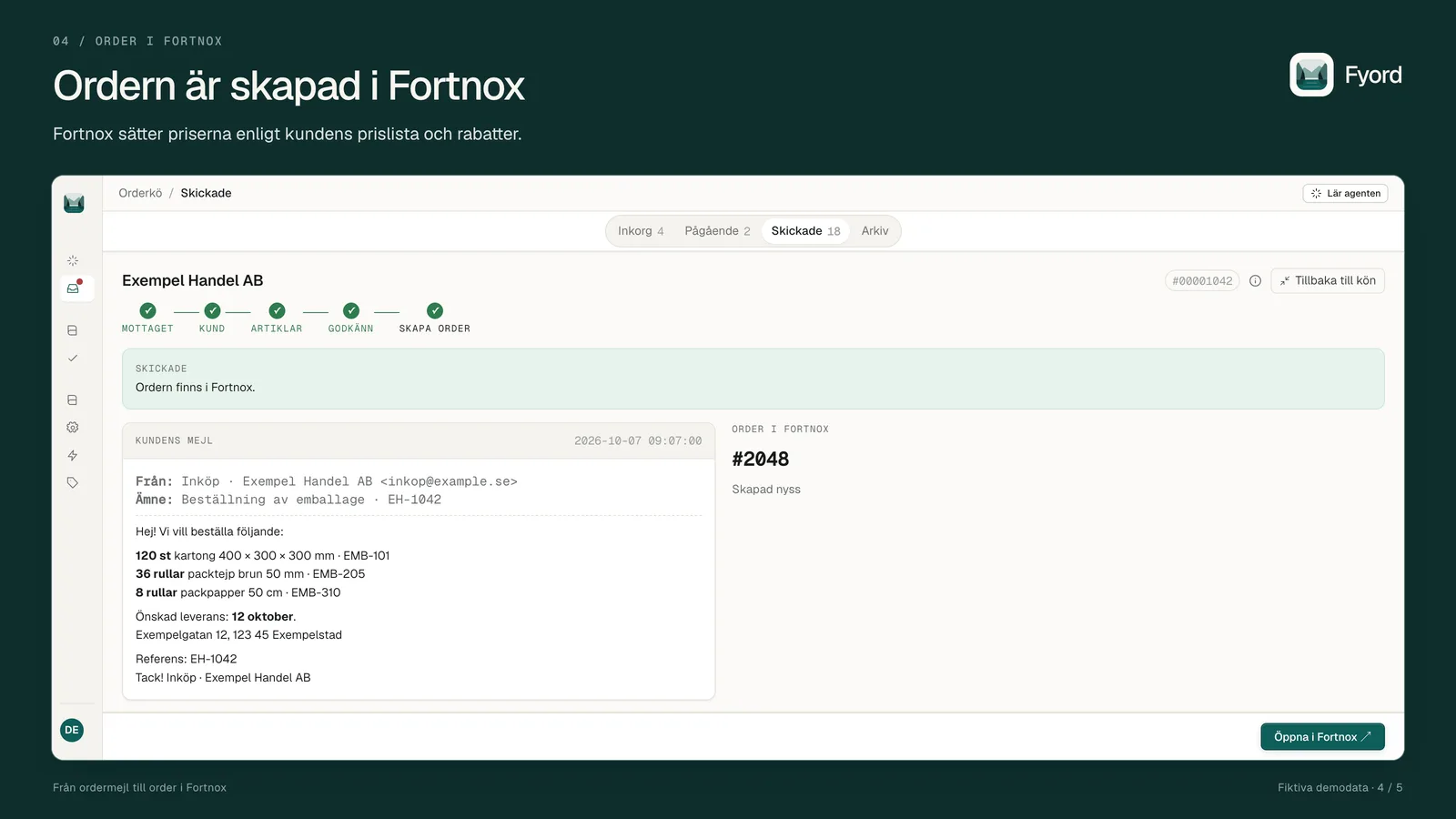
After your approval, the order is created in Fortnox with item numbers and quantities. Fortnox applies the customer's price list and discounts.
You approve. Then the order is created.
The draft lives in Fyord. Only after a person reviews and approves it does Fyord create a new order in Fortnox.
Email + attachments
Customer email, PDF, Excel and CSV
- Fortnox → Fyord
Records, prices and order history
Draft in Fyord
Customer and items matched
You approve
Review and edit as needed
New Fortnox order
Fortnox sets the prices
Fortnox → Fyord: data read
- Customers and items are retrieved to match the order against your records.
- Price lists and prices are read for price checks. Order history supports matching and checks for possible duplicates.
- Company information is read to verify which company you are connecting.
Fyord → Fortnox: data written
- A new order is created after your approval with the customer number, item numbers and quantities.
- Delivery details and the requested delivery date are sent when complete. The customer's order reference and notes can also be included. Fyord also stamps its own reference in External invoice reference 1 to prevent duplicates.
- No prices are sent. Fyord does not change your customer or item records in Fortnox.
You connect through OAuth 2.0. Fortnox permissions technically grant both read and write access to the relevant records, and the connection currently also requests the Offer and Invoice permissions, which Fyord does not use. Fyord's use is narrower: we read the data listed above and only write new orders after your approval. This describes the service's behaviour, not a technical restriction of the permissions in Fortnox.
From order queue to order in Fortnox
Screenshots from Fyord's Swedish interface with fictional demo data.
For wholesalers with orders in their inbox
Fyord is built for Nordic wholesalers using Fortnox who receive customer orders by email. It suits teams that still enter order lines by hand and want to stay in control before orders are registered.
- You use customer and item records in Fortnox.
- Your customers send orders as emails or attachments.
- Your team reviews and approves order drafts in Fyord.
Creating orders requires the Order module and the Fortnox Integration licence. Your Fortnox subscription and any licence fees are paid separately to Fortnox.
Get started with your own order emails
Guided onboarding with our support
We connect your inbox and Fortnox with you and go through your own sample orders. We show you how to review matches, edit drafts and approve an order.
No setup fee. If you would like to see the workflow before buying, we offer a free walkthrough.
Book guided onboardingOr create an account yourself
- 1Create an account at app.getfyord.com.
- 2Follow onboarding: choose Connect Fortnox, then connect your inbox or forwarding.
- 3Sign in to Fortnox and approve access. After onboarding, you find the connection under Settings → Connections.
- 4Let your records sync. We contact you and go through the setup together. After onboarding you get a secure payment link (via Polar), and once it is paid we activate order processing.
How to disconnect
Go to Settings → Connections and select Disconnect on the Fortnox card. You can also disable the connection through Mina integrationer in Fortnox; Fyord detects that at the next token refresh and shows that the connection needs to be re-authorised. Disconnecting ends the connection; it does not cancel your subscription or automatically delete stored data.
Cancellation and the handling of stored data are described in our terms of service and privacy policy.
One plan for your order desk.
All features and guided onboarding are included. For higher order volumes, we agree a custom price.
- Order drafts from email, PDF, Excel and CSV
- Customers and items matched against Fortnox
- Review and approval before order creation in Fortnox
- No setup fee – guided onboarding included
- No lock-in
After onboarding you get a secure payment link from our payment partner Polar (merchant of record); the subscription is charged monthly in advance. Cancel any time, effective at the end of the paid period.
1,000 orders per calendar month are included. An order counts when Fyord creates it in Fortnox after your approval. Emails that are not orders, rejected drafts and stopped duplicates do not count.
Fyord keeps processing above 1,000 orders while we contact you about a volume price. At 2,000 orders, processing pauses until the next calendar month or until a volume agreement is activated.
Your subscription is with Fyord, not through Fortnox. You also need the Fortnox Order module and Fortnox Integration licence.
Questions about Fyord and Fortnox
Is any order created without my approval?
No. Fyord prepares a draft in Fyord. A person reviews and approves it before an order is created in Fortnox.
What happens if a customer or item is not recognised?
The order checklist shows whether the customer and items have been identified. You can choose the right customer or item and correct the draft before approving. If a customer or item is missing from your records, add it in Fortnox. Fyord does not create customers or items there.
Which prices will the order use?
Fortnox applies the customer's price list and discounts. Fyord sends the customer number, item numbers and quantities, but no prices, when the approved order is created.
Can I disconnect Fortnox at any time?
Yes. Select Disconnect on the Fortnox card under Settings → Connections, or disable the connection through Mina integrationer in Fortnox. Disconnecting does not cancel your subscription or automatically delete stored data.
How do I cancel Fyord?
You can cancel at any time by emailing pd@rizze.ai or through the link in Polar's emails. The subscription is paid through a secure payment link from Polar and charged monthly in advance; cancellation takes effect at the end of the paid period. No lock-in and no setup fee.
About Fortnox
Fortnox – in the heart of business life
Fortnox empowers businesses to launch, grow, and thrive. Through cutting-edge technical solutions for companies and accounting firms, streamlined financing, and a powerful ecosystem of partnerships, Fortnox stands as the vital hub for entrepreneurship in Sweden. Our vision: a prosperous society shaped by thriving businesses.
Fortnox was established in 2001, with the main office in Växjö. For more information, visit fortnoxgroup.se.
Read more about FortnoxYour inbox, in Fortnox, done.
We walk through your order workflow and your own examples together. Guided onboarding is included.